Connect notification channels
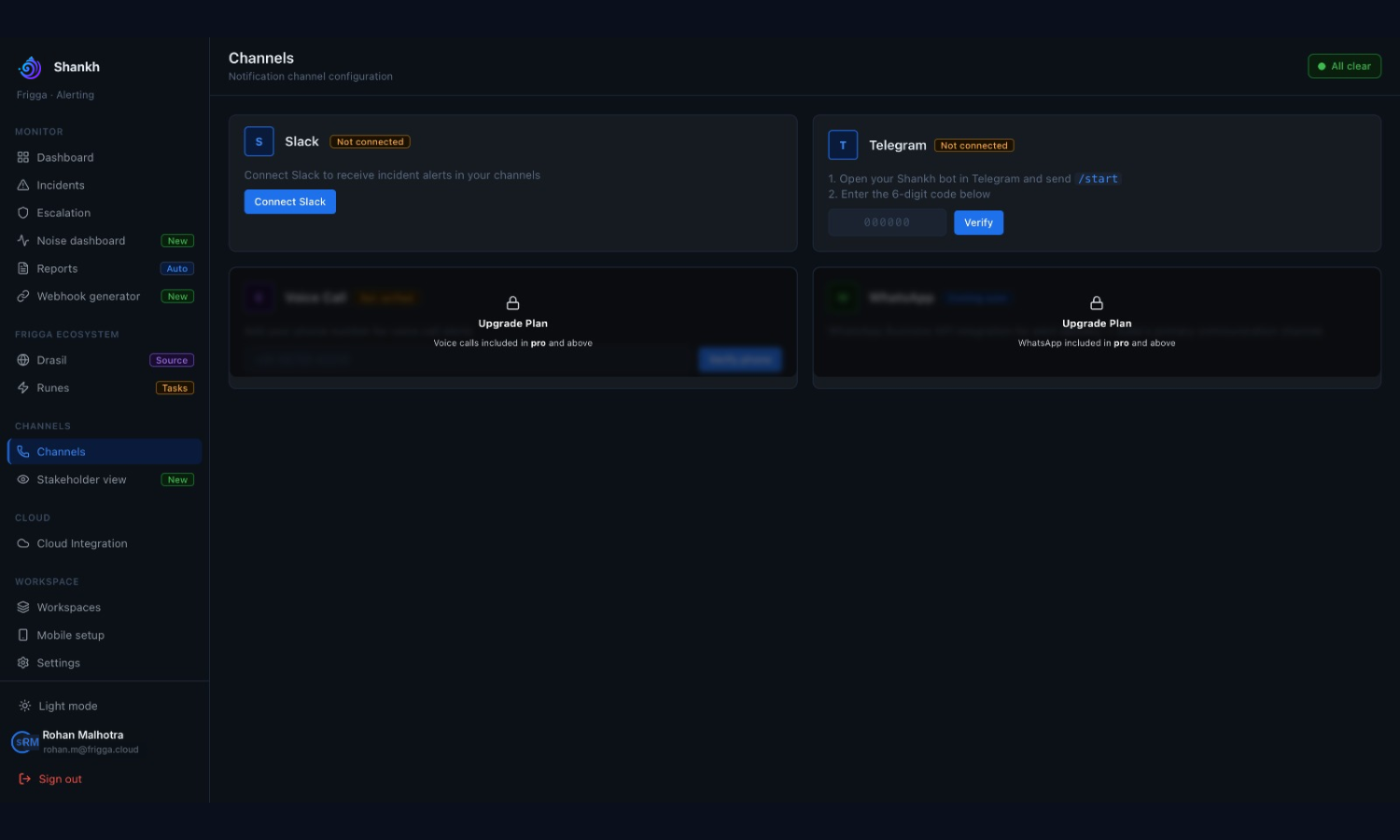
Slack, Telegram and mobile push are the channels that currently deliver incidents. Connect and test them before configuring escalation, because a level pointing at a channel that has never delivered reaches nobody.
Connect Slack
- Open Channels.
- Select Connect Slack.
- Authorise the app in the Slack workspace when Slack prompts you.
- Choose the Slack workspace to connect.
- Confirm Slack shows as connected in Shankh.
| Bot scope requested | What it is for |
|---|---|
| chat:write | Post incident messages |
| chat:write.customize | Post under the Shankh name and icon |
| channels:read | List public channels for severity mapping |
| groups:read | List private channels it has been added to |
| im:write | Open a direct message to notify someone |
The app requests bot scopes only. It asks for no user scopes, so it can never act as an individual.
Slack shows the name of your own Shankh app during authorisation — the app registered under your deployment's Slack client ID. Check it against your Slack admin dashboard if you are unsure what you are approving.
Map Slack severities to channels
- View the available Slack channels in Channels.
- Map each incident severity to the Slack channel that should receive it.
- Create a Slack channel from Shankh if the one you want does not exist.
- Update the workspace mappings so each workspace posts to the right place.
- Save the mapping.
Connect Telegram
- Open Channels and start the Telegram connection.
- Open your deployment's Shankh bot in Telegram, in a private chat.
- Send /start to the bot.
- Enter the six-digit code it replies with into Shankh.
- Complete verification.
Telegram will not deliver until the user has sent /start in a private chat with the bot. Someone who never opens the bot silently receives nothing.
A code is valid for 5 minutes and works once — it is deleted the moment it verifies. Requesting a new code does not invalidate the old one, so every code issued in the last 5 minutes still works and any of them will do.
Send a test notification
- Trigger a low-severity test alert, or run the end-to-end test.
- Confirm the message arrives in the mapped Slack channel.
- Confirm the Shankh bot delivers to Telegram.
- Confirm the message identifies the workspace, service and severity.
Do this for every channel your team will rely on, and again after any change to channels or escalation.
If a channel does not deliver
- The channel is currently supported for delivery — Slack, Telegram and mobile push only.
- The authorisation completed rather than being cancelled, and the Shankh app is still installed in Slack.
- A severity-to-channel mapping exists for the severity you tested.
- For Telegram, the user has sent /start to the bot and verified a code issued in the last 5 minutes.
- If it still fails, disconnect and repeat the connection flow, or move the escalation step to a channel that is delivering.
WhatsApp, voice calls, SMS and email are not currently available for incident delivery. Some may still appear in parts of the interface — do not use them as production escalation channels.